Skip to content

Memory for you and your agents

From the big picture to the last detail.

A shared memory for the whole project. Connect goals, architecture, decisions, and implementation—so every agent can find its context and leave knowledge for the next session.

Coding agent · AtlasIllustrative session
  1. You · next session

    “Continue the authentication work. Why did we choose server-side sessions?”

  2. knowen · search_nodesquery: "session decision"3 matches
  3. knowen · get_nodeUse server-side sessionsAccepted decision
  4. Agent · with project context

    “The decision calls for central revocation. I’ll keep that constraint while reviewing the session callback, and record the review on the task.”

    Source · Architecture decision
The agent finds the decision, follows it, and writes what it learns back.

Works with any MCP client

  • Claude Code
  • Claude Desktop
  • Cursor
  • VS Code
  • ChatGPT
  • Streamable HTTP
Atlas / Project memory
Illustrative project

A place for the whole picture.

General context on the left. Specific knowledge on the right. Select a node to look inside.

Architecture decision

Accepted decision

Use server-side sessions.

We chose server-side sessions so access can be revoked centrally. The decision links to authentication work and records the alternative we considered: long-lived client tokens.

Reason · Central revocation and access control

One connected project. Many paths into the knowledge you need.

Let the structure carry the context

Start broad. Go deeper as the work demands.

Keep the purpose in view.

Goals, constraints, and conventions give the project a common starting point. Connect specific work back to the larger reason for doing it.

Follow the branch that matters.

An agent working on authentication moves from project context to architecture, requirements, and the details of its task.

Leave a useful trail.

Record decisions, findings, code references, and verification where they belong, so later sessions build on what the project already knows.

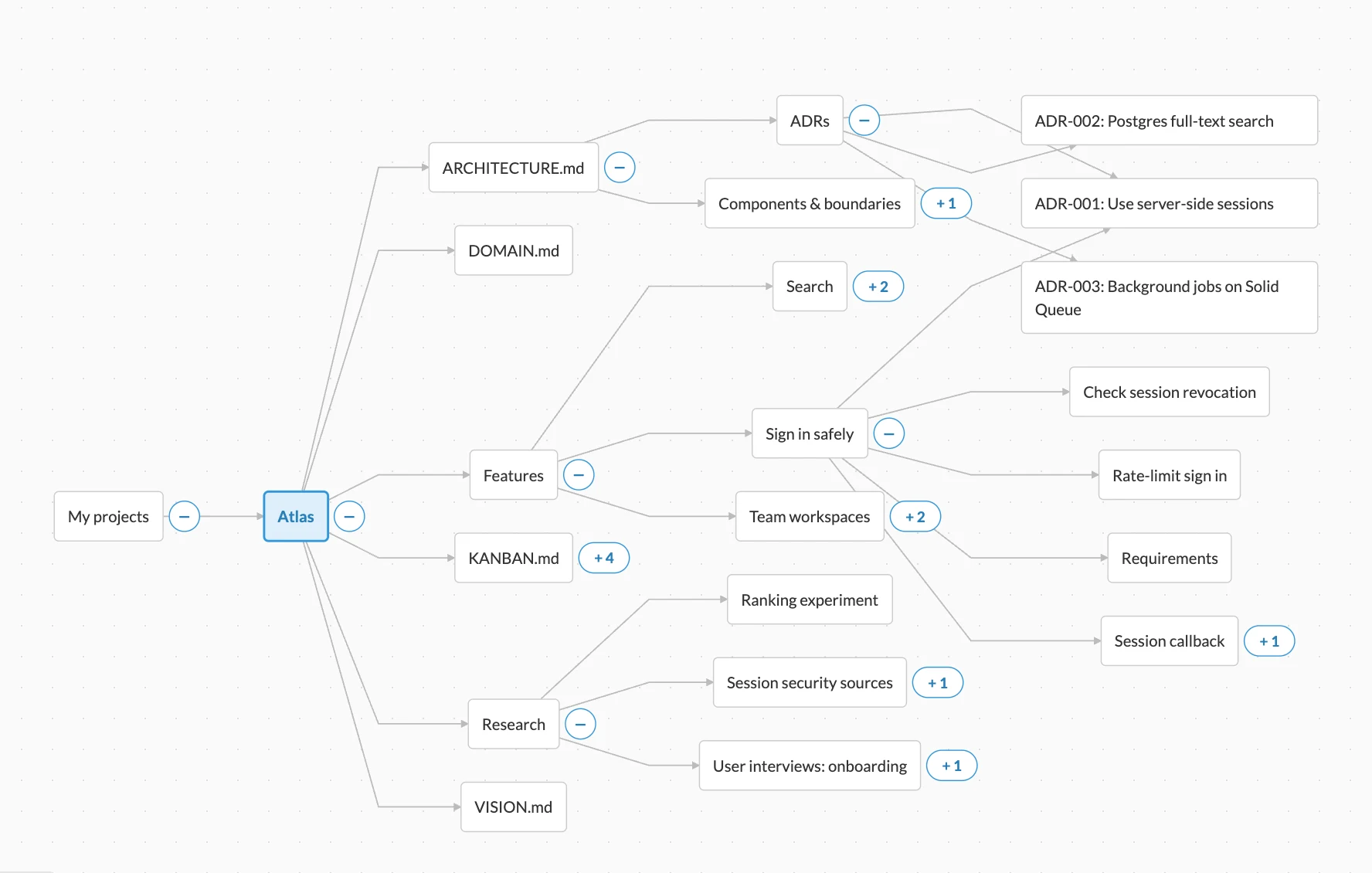
Atlas / Graph of nodes
Screenshot · example project
Knowen graph of the Atlas project: the project root branches into architecture, features, research, and Kanban; ADR-001 is reached from ADRs, the sign-in feature, and session security research.
General context on the left, specific work on the right. ADR-001 belongs to the architecture, the sign-in feature, and the research behind it—one node, three paths.

One idea, many places.

A decision can belong to the architecture and to the feature that uses it. A finding can inform several tasks—without copies drifting apart.

See how knowledge changed.

Content history and comments show who changed what and why, so you can review an agent’s contribution before you rely on it.

Share when you choose.

Grant collaborators access to a project, and publish knowledge when you want to share it more broadly.

How it works

Four steps to a project that remembers.

  1. 1

    Create a project

    Give the work a home: a root for its purpose, goals, and conventions—the context every agent should start from.

  2. 2

    Add the context that matters

    Architecture, decisions with their reasons, research, and task plans. Branch from the general to the specific.

  3. 3

    Connect your agent

    One MCP endpoint. Your agent can search and read project knowledge, and write results back.

  4. 4

    Tell it when to remember

    Add a few lines to AGENTS.md: when to read from Knowen before working, and what to write back when a decision is made or a task is done.

MCP server
https://mcp.knowen.org/mcp
Claude Code
claude mcp add knowen https://mcp.knowen.org/mcp --transport http --scope user --header "Authorization: Bearer YOUR_KNOWEN_API_TOKEN"
AGENTS.md
## Project memory

This project's knowledge lives in Knowen. Use the knowen MCP server.

Read from Knowen:
- Before starting a task: the project overview, the task, and related decisions.
- Before changing a design: the decisions and reasons behind it.

Write to Knowen:
- After a decision: what you chose, why, and the alternatives.
- After finishing a task: findings, code references, and verification results.

Using Claude Desktop, Cursor, VS Code, or ChatGPT? See every setup guide →

Use case · Kanban for agents

Many agents. One task memory.

Plan, build, review, and verify on a board. Each card keeps its decisions, code references, and evidence in the project graph, so the next agent picks up with the full story.

ArchitectDecides the approach and records the reasons.
DesignerShapes the flow and its edge cases.
CoderLinks the implementation to the plan.
ReviewerAttaches findings and fixes to the revision.
01

Start from the same context.

Every contributor gets the goal, constraints, and acceptance criteria, connected to the architecture the task depends on.

02

Give the detail somewhere to live.

Branch a task into approach, design, implementation, and review—each readable and linked to the shared plan.

03

Make completion inspectable.

When review finds a problem, the task returns to In Progress with the finding attached. Verification closes the loop against the revised code.

Make memory part of the workflow

A few practical questions.

What should I put in project memory?

Start with purpose, terminology, conventions, and architecture. Add decisions with reasons, research sources, task plans, review findings, and verification as work develops.

How do agents use that memory?

Through MCP, compatible agents can search and read accessible project knowledge, then write useful results back. Your workflow determines what to record and when to consult it.

Open the MCP setup guide →
Can the same decision connect to several areas?

Yes. Knowen supports multiple paths to the same knowledge node, so a decision can belong to the architecture and the feature that uses it.

Can I review changes and share knowledge?

Use content history and comments to inspect how knowledge evolves. Grant collaborators access to your project, and publish knowledge when you choose to share it more broadly.

How do I get access?

Knowen is in beta. Create an account, start a project, and connect your agent.

See pricing →

A place to pick up where you left off

Give your project a place to remember.

Create a project, give it context, and connect the coding agents you already use.